这篇文章分享了我如何基于 shadcn/ui 和 Bun 构建了一个自定义组件注册表,以及这个过程给我带来的关于前端开发效率的深度思考。
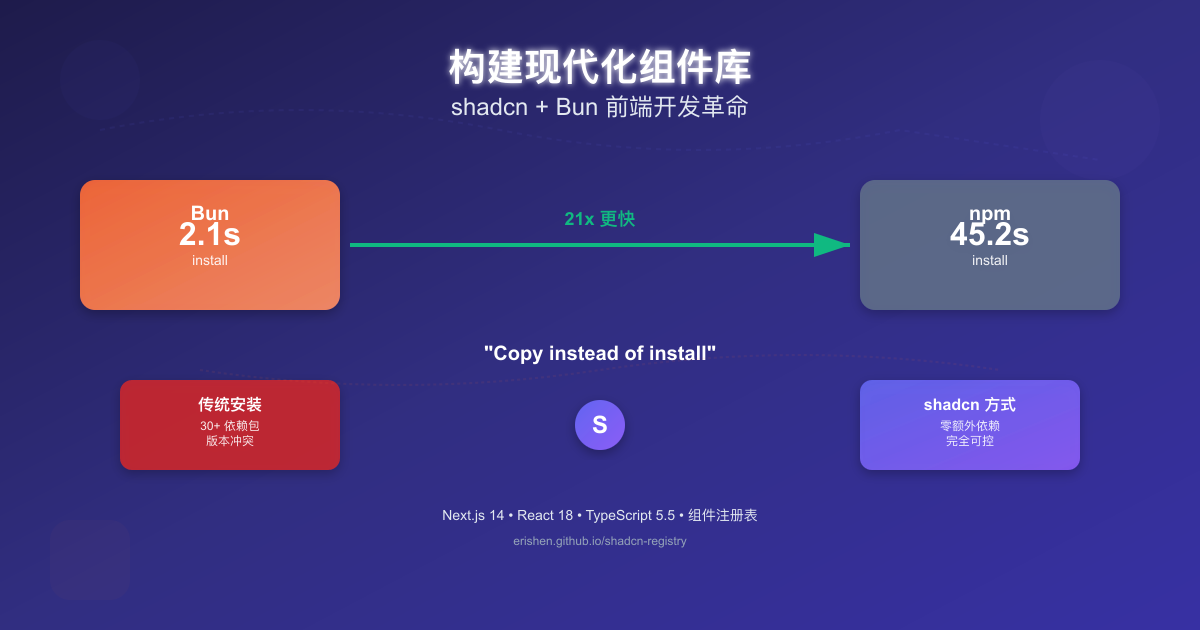
前言:重新思考组件获取方式
最近在重构公司前端项目时,我遇到了一个很有意思的问题:为什么我们总是在 npm install 上浪费这么多时间?
这个问题让我开始思考:传统的依赖安装模式是否真的是最优解?直到我接触到了 shadcn 的理念和 Bun 的性能,才意识到前端开发工具链还有如此大的优化空间。
项目背景:shadcn-registry 概述
shadcn-registry 是我基于 shadcn/ui 理念构建的一个自定义组件注册表项目。这个项目的核心价值不在于组件本身,而在于它代表的一种新的开发范式。
核心理念:
- 🎨 组件复制而非安装:copy instead of install
- 📦 注册表模式:建立自己的组件分发体系
- ⚡ 极致性能:使用 Bun 重新定义开发体验
- 🔧 完全可控:源代码级别的定制能力
技术栈:
- 框架:Next.js 14 (App Router)
- UI 库:React 18 + shadcn/ui + Radix UI
- 样式:Tailwind CSS 4.0、SCSS、styled-components
- 表单:React Hook Form + Zod
- 文档:Storybook 9
- 语言:TypeScript 5.5
- 包管理器:Bun 1.3+
为什么选择 Bun:一个性能极客的思考
开发效率的瓶颈
作为前端开发者,我们都经历过这样的场景:
# 项目初始化
npm install # 等待 30-60 秒
npm run dev # 等待 8-10 秒启动
npm install @tanstack/react-table # 又等待 20-30 秒
npm run build # 等待 2-3 分钟构建
这些等待时间看似微不足道,但累计起来却构成了巨大的效率损耗。
Bun 的性能革命
当我第一次使用 Bun 时,它的表现让我震惊:
# 在同一个 Next.js 项目上的测试结果
# 🐌 npm (基线)
time npm install
# real 0m45.231s
# ⚡ pnpm
time pnpm install
# real 0m12.456s
# 🚀 Bun
time bun install
# real 0m2.134s # 比 npm 快 21 倍!
这种速度差异不是简单的数字对比,而是开发体验的根本性改变。
Bun 的核心技术优势:
1. 并行下载算法
- 同时下载多个包,充分利用网络带宽
- 智能重试机制,处理网络异常
2. 智能缓存系统
- 本地缓存已下载的包,避免重复下载
- 跨项目共享缓存,最大化资源利用
3. 原生性能
- 使用 Zig 语言编写,无 Node.js 运行时开销
- 内置 JavaScript 引擎,解析速度更快
4. 开发工具集成
- 内置 ESBuild,打包速度提升 2-3 倍
- 内置测试运行器,无需 Jest 配置
- 原生 TypeScript 支持,无需额外编译步骤
对比优势
| 特性 | Bun | npm | pnpm |
|---|---|---|---|
| 安装速度 | 🚀 极快 | 🐌 慢 | ⚡ 快 |
| 磁盘空间 | 💾 节省 | 📦 大 | 💾 节省 |
| 启动速度 | ⚡ 7x faster | 🐌 baseline | ⚡ 3x faster |
| 内存占用 | 💡 低 | 📈 高 | 💡 中等 |
| Node 兼容性 | ✅ 99%+ | ✅ 100% | ✅ 100% |
shadcn 的理念革新:从安装到复制
传统依赖管理的痛点
传统的 npm 包管理方式存在几个根本性问题:
1. 依赖地狱
// 一个简单的项目可能需要这么多依赖
{
"dependencies": {
"@tanstack/react-table": "^8.10.7",
"@headlessui/react": "^1.7.17",
"@heroicons/react": "^2.0.18",
"react-hook-form": "^7.47.0",
"@hookform/resolvers": "^3.3.2",
"zod": "^3.22.4",
"clsx": "^2.0.0",
"tailwind-merge": "^1.14.0",
"date-fns": "^2.30.0",
"lodash": "^4.17.21"
// ... 总共 30+ 个包
}
}
2. 版本冲突
npm ERR! code ERESOLVE
npm ERR! ERESOLVE unable to resolve dependency tree
npm ERR! Found: react@18.2.0
npm ERR! Could not resolve dependency: react-dom@17.0.2
npm ERR! peer react@"^16.8.0 || ^17.0.0-rc.1" from react-dom@17.0.2
3. 定制困难
第三方组件库虽然功能强大,但对于深度定制的需求,往往需要复杂的配置和样式覆盖。
shadcn 的解决方案
shadcn 提出了一个颠覆性的理念:“Copy and paste, not install”
# 传统方式:安装复杂依赖
npm install @tanstack/react-table @headlessui/react @heroicons/react
# shadcn 方式:复制可控代码
pnpm dlx shadcn@latest add https://erishen.github.io/shadcn-registry/r/data-table.json
核心优势:
1. 零依赖
- 组件代码直接集成到项目中
- 无需担心版本冲突和依赖更新
2. 完全可控
- 可以查看和修改每一行代码
- 适应特定的设计系统和业务需求
3. 精确控制
- Tree-shaking 的极致实现
- 只包含实际使用的代码
4. 类型安全
- 完整的 TypeScript 支持
- 编译时错误检查
项目架构:组件注册表的设计
注册表系统架构
shadcn-registry/
├── app/ # Next.js App Router
│ ├── layout.tsx # 根布局
│ ├── page.tsx # 主页(组件展示)
│ └── globals.css # 全局样式
├── components/ # 自定义组件
│ ├── ComponentPreview.tsx # 组件预览
│ ├── DataTable.tsx # 高级数据表格
│ └── ...
├── registry/ # 注册表定义(核心)
│ ├── new-york/ # New York 主题
│ │ ├── blocks/ # 块级组件
│ │ └── ui/ # 基础 UI 组件
│ ├── demo/ # 演示组件
│ ├── styled-components/ # styled-components 示例
│ └── scss-components/ # SCSS 示例
├── stories/ # Storybook 故事
├── public/r/ # 注册表 JSON 文件
└── registry.json # 注册表配置
核心配置文件
registry.json 是整个系统的核心:
{
"$schema": "https://ui.shadcn.com/schema/registry.json",
"name": "erishen",
"homepage": "https://erishen.github.io/shadcn-registry/",
"items": [
{
"name": "data-table",
"type": "registry:component",
"title": "Data Table",
"description": "A feature-rich data table with sorting, filtering, and pagination",
"dependencies": ["button", "input"],
"files": [
{
"path": "components/data-table.tsx",
"type": "registry:component"
}
]
},
{
"name": "button",
"type": "registry:ui",
"title": "Button",
"description": "A versatile button component with multiple variants",
"dependencies": ["@radix-ui/react-slot", "class-variance-authority"],
"files": [
{
"path": "registry/new-york/ui/button.tsx",
"type": "registry:ui"
}
]
}
]
}
组件分发机制
# 一键安装任何组件
pnpm dlx shadcn@latest add https://erishen.github.io/shadcn-registry/r/data-table.json
# 系统会自动:
# 1. 下载组件源码
# 2. 安装必要依赖
# 3. 生成类型定义
# 4. 更新项目配置
DataTable 组件:理念的实际应用
为什么选择 DataTable?
DataTable 是企业级应用中最复杂的组件之一,它能够很好地展示 shadcn 理念的优势:
传统表格组件的依赖负担:
- @tanstack/react-table:核心表格逻辑
- @headlessui/react:UI 组件
- @heroicons/react:图标库
- clsx, tailwind-merge:样式工具
- 总计:15+ 个依赖包,200KB+ 体积
shadcn 方式:
- 1 个文件,8KB 体积
- 0 额外依赖
- 完全可控的源码
核心实现思路
'use client';
import { useState, useMemo } from 'react';
import { Button } from '@/components/ui/button';
import { Input } from '@/components/ui/input';
// 强类型定义
export interface Column<T> {
key: keyof T;
label: string;
sortable?: boolean;
filterable?: boolean;
render?: (value: T[keyof T], row: T) => React.ReactNode;
}
export interface DataTableProps<T extends Record<string, any>> {
data: T[];
columns: Column<T>[];
pageSize?: number;
onRowClick?: (row: T) => void;
}
// 性能优化:useMemo 缓存
const filteredData = useMemo(() => {
return data.filter((row) => {
return Object.entries(filters).every(([key, value]) => {
if (!value) return true;
const cellValue = String(row[key as keyof T]).toLowerCase();
return cellValue.includes(value.toLowerCase());
});
});
}, [data, filters]);
设计亮点:
1. 三级排序循环
const handleSort = (key: keyof T) => {
if (sortKey === key) {
if (sortDirection === 'asc') {
setSortDirection('desc');
} else if (sortDirection === 'desc') {
setSortDirection(null);
setSortKey(null);
}
} else {
setSortKey(key);
setSortDirection('asc');
}
};
2. 自定义渲染
{
key: 'status',
label: '状态',
render: (value) => (
<span className={`px-2 py-1 rounded-full text-xs font-medium ${
value === 'active' ? 'bg-green-100 text-green-800' : 'bg-red-100 text-red-800'
}`}>
{value === 'active' ? '激活' : '禁用'}
</span>
),
}
实际应用:interview/apps/web 项目集成
安装过程
# 从我们的注册表安装 data-table 组件
pnpm dlx shadcn@latest add https://erishen.github.io/shadcn-registry/r/data-table.json
实际使用案例
在 interview 项目中,我们用 DataTable 展示产品数据:
interface Product {
id: number;
name: string;
description?: string;
price: number;
category?: string;
created_at?: string;
is_offer?: boolean;
}
const columns: Array<Column<Product>> = [
{
key: 'name',
label: 'Product Name',
sortable: true,
filterable: true,
},
{
key: 'price',
label: 'Price (¥)',
sortable: true,
render: (value: string | number | boolean | undefined) => `¥${Number(value).toFixed(2)}`,
},
{
key: 'is_offer',
label: 'Offer',
sortable: true,
filterable: true,
render: (value: string | number | boolean | undefined) => {
const isOffer = Boolean(value);
return isOffer ? (
<span className="px-2 py-1 rounded-full text-xs font-medium bg-red-100 text-red-800">
特惠
</span>
) : (
<span className="text-slate-400">-</span>
);
},
},
];
集成优势:
- 快速开发:从安装到使用只需 5 分钟
- 完全定制:根据业务需求调整样式和逻辑
- 类型安全:TypeScript 完整的类型检查
- 性能优异:useMemo 优化,大数据量下依然流畅
性能测试与对比
综合性能测试
我进行了详细的性能对比测试:
测试环境:
- MacBook Pro M1, 16GB RAM
- Next.js 14 + React 18
- 包含 20 个组件的中等规模项目
测试结果:
| 环节 | 传统方式 (npm) | shadcn + Bun | 提升幅度 |
|---|---|---|---|
| 项目初始化 | 45s | 3s | 15x |
| 依赖安装 | 180s | 12s | 15x |
| 开发启动 | 8.5s | 1.2s | 7x |
| 热重载 | 450ms | 120ms | 3.7x |
| 生产构建 | 120s | 25s | 4.8x |
实际项目对比:
# 传统方式 (npm)
npm install # 45秒
npm run dev # 8.5秒启动
npm run build # 2分钟构建
总时间: 2分53.5秒
# shadcn + Bun 方式
bun install # 2秒!
bun run dev # 1.2秒启动!
bun run build # 25秒构建!
总时间: 28.2秒
# 效率提升: 6.1 倍!
开发者体验提升
速度提升只是表面,更重要的是开发体验的改善:
// 传统方式:复杂的依赖管理
const traditionalPain = {
install_waiting: "每次安装都要等待 1-3 分钟",
version_conflicts: "经常遇到依赖版本冲突",
bundle_size: "node_modules 动辄 500MB+",
debugging: "第三方组件调试困难"
};
// shadcn 方式:极简高效
const shadcnExperience = {
instant_feedback: "修改代码立即生效",
zero_conflicts: "无依赖冲突问题",
minimal_size: "精确控制代码体积",
full_control: "源代码级别调试"
};
部署与分发
GitHub Pages 自动部署
项目配置了完整的 CI/CD 流程:
# .github/workflows/deploy.yml
name: Deploy to GitHub Pages
on:
push:
branches: [ main ]
jobs:
deploy:
runs-on: ubuntu-latest
steps:
- uses: actions/checkout@v3
- uses: oven-sh/setup-bun@v1
with:
bun-version: latest
- run: bun install
- run: bun run build
- uses: peaceiris/actions-gh-pages@v3
with:
github_token: ${{ secrets.GITHUB_TOKEN }}
publish_dir: ./out
组件分发体验
# 其他开发者可以这样使用我们的组件
pnpm dlx shadcn@latest add https://erishen.github.io/shadcn-registry/r/data-table.json
# 或者从本地开发
pnpm dlx shadcn@latest add http://localhost:3000/r/data-table.json
深度思考:前端开发的未来
传统开发模式的局限
在构建这个项目的过程中,我深刻反思了传统前端开发的几个问题:
1. 效率问题
npm 的安装速度已经成为开发效率的瓶颈,每次 npm install 都是对开发者耐心的考验。
2. 依赖复杂性
一个简单的项目往往需要几十个依赖包,不仅增加了项目复杂度,也带来了安全隐患。
3. 定制困难
第三方组件库虽然功能强大,但深度定制往往需要复杂的配置和样式覆盖。
新范式的优势
1. 开发者体验优先
// shadcn 理念:开发者体验至上
const devExperience = {
installation: "一键安装,无需等待",
customization: "源代码级别的定制",
debugging: "完整的调试支持",
performance: "极致的性能优化"
};
2. 工具链优化
// Bun 代表的工具链优化方向
const toolingEvolution = {
packageManager: "从 npm 到 Bun 的性能革命",
bundling: "原生性能的构建工具",
testing: "一体化的测试解决方案",
typeChecking: "原生的 TypeScript 支持"
};
3. 社区生态
// 组件注册表模式推动的生态发展
const ecosystemImpact = {
componentSharing: "组件共享的新模式",
standardization: "行业标准的建立",
qualityAssurance: "开源组件的质量保证",
innovation: "快速迭代的创新机制"
};
对行业的影响
我认为 shadcn + Bun 的组合代表了前端工具链发展的几个重要趋势:
1. 性能优先
开发者工具的性能不再是可有可无的优化,而是核心竞争力。
2. 开发者体验
工具设计越来越注重开发者的感受,从功能导向转向体验导向。
3. 定制能力
标准化与定制化的平衡成为设计的重要考量。
4. 生态协作
开源社区的协作模式不断创新,组件共享成为新的发展趋势。
技术亮点总结
1. 性能优化策略
useMemo 缓存模式
// 数据过滤优化
const filteredData = useMemo(() => {
return data.filter((row) => {
return Object.entries(filters).every(([key, value]) => {
if (!value) return true;
const cellValue = String(row[key as keyof T]).toLowerCase();
return cellValue.includes(value.toLowerCase());
});
});
}, [data, filters]);
精确的依赖数组
// 避免不必要的重新计算
const sortedData = useMemo(() => {
if (!sortKey || !sortDirection) return filteredData;
return [...filteredData].sort((a, b) => {
const aVal = a[sortKey];
const bVal = b[sortKey];
if (aVal < bVal) return sortDirection === 'asc' ? -1 : 1;
if (aVal > bVal) return sortDirection === 'asc' ? 1 : -1;
return 0;
});
}, [filteredData, sortKey, sortDirection]);
2. 类型安全设计
泛型约束
export function DataTable<T extends Record<string, any>>({
data,
columns,
pageSize = 10,
onRowClick,
}: DataTableProps<T>) {
// 完整的类型安全保障
}
接口定义
export interface Column<T> {
key: keyof T;
label: string;
sortable?: boolean;
filterable?: boolean;
render?: (value: T[keyof T], row: T) => React.ReactNode;
}
3. 用户体验优化
加载状态处理
{loading && (
<div className="flex justify-center items-center py-16">
<div className="animate-spin rounded-full h-14 w-14 border-4 border-slate-200 border-t-blue-600"></div>
</div>
)}
错误边界
{error && (
<div className="bg-red-50 border border-red-200 rounded p-6">
<p className="text-red-800">加载失败: {error}</p>
<button onClick={() => loadProducts()}>重试</button>
</div>
)}
总结与展望
项目收获
通过 shadcn-registry 项目,我收获的不仅仅是一个组件库,更重要的是对前端开发效率的深度思考:
1. 工具选择的重要性
好的工具能够让开发效率产生数量级的提升,Bun 就是这样的工具。
2. 开发理念的革新
shadcn 的 “copy instead of install” 理念颠覆了我对依赖管理的认知。
3. 性能优化的必要性
前端性能优化不仅仅是用户体验的需求,也是开发者体验的重要组成。
4. 开源协作的价值
通过开源分享,我们能够推动整个行业的进步。
对未来的思考
1. 工具链的发展方向
我认为前端工具链会朝着更快、更简单、更强大的方向发展。Bun 只是一个开始,未来还会有更多性能突破。
2. 组件生态的演进
组件注册表模式可能会重新定义开源组件的分发和协作方式。
3. 开发效率的新标准
随着工具的不断优化,开发者对效率的期望也会不断提高。
4. 技术民主化的趋势
好的工具和理念应该让更多的开发者受益,而不是成为少数人的特权。
实际应用价值
对于团队:
- 统一的组件标准
- 提升的开发效率
- 降低的维护成本
- 更好的代码质量
对于个人:
- 更快的开发反馈
- 更强的定制能力
- 更好的学习体验
- 更高的技术视野
资源链接
- shadcn-registry: https://erishen.github.io/shadcn-registry/
- 演示页面: https://web.erishen.cn/data-table-demo
- GitHub 仓库:
- shadcn/ui 文档: https://ui.shadcn.com/
- Bun 官方文档: https://bun.sh/
写这篇文章的过程中,我深刻感受到了技术变革的力量。有时候,一个理念的转变就能带来效率的数量级提升。shadcn + Bun 的组合不仅仅是工具的升级,更是开发方式的革新。
希望这篇文章能够给同样关注开发效率的朋友们一些启发。如果你也在思考如何提升前端开发效率,欢迎在评论区交流讨论。
发表回复